

To put yourself in a GTA clip, make an AI character from a few photos of your own face, then let a character swap recast the person in the video with you, keeping the moves, the camera and the sound. On our sister site eroq.ai that is Video, Replace, with the viral GTA goodbye clips ready as one-click templates.
One rule before anything else: only your own face, or the face of someone who said yes. eroq is made by the same team as GoonTheftAuto, and neither site is affiliated with Rockstar Games.
What a character swap does
A character swap replaces the people in an existing video with characters you choose and keeps everything else: the timing, the gestures, the lip movement, the camera move and the original audio. On eroq it runs on eroq Replace Pro, eroq's own engine, so your clip and your photos never go to an outside video provider.
- Up to four people in one clip, each replaced by a character of yours, left to right as they stand.
- 2 to 10 seconds per render. A longer clip, like a whole TikTok, goes in as Every shot: the studio finds its own cuts, renders the pieces and puts them back together over the original sound, up to 60 seconds from a link.
- A head swap or the whole person. Keep the clip's clothes and only the face and hair change; give your character their own outfit, or describe one, and the whole person changes.
Step 1: make your character
- Open Characters on eroq and create one from 1 to 9 photos of yourself.
- Pick good photos. Front-facing, sharp, well lit, no sunglasses. A cap or a hand over the face makes it harder.
- Let it build the identity sheet. That sheet is what keeps your face steady through every frame of the clip. The free credits of a new account cover your first one.
Rather not use your face at all? Describe an original character in a few words, or build one in the character designer, and cast that instead.
Step 2: pick a GTA template
eroq's GTA 6 AI page lists the GTA templates, each one the original viral fan clip, shot for shot:
| Template | What happens |
|---|---|
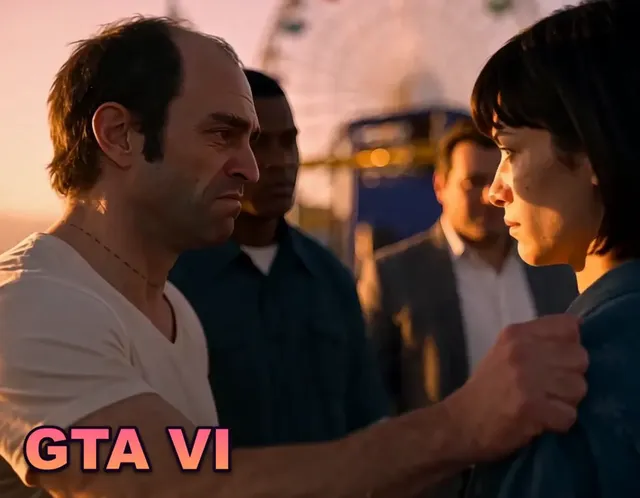
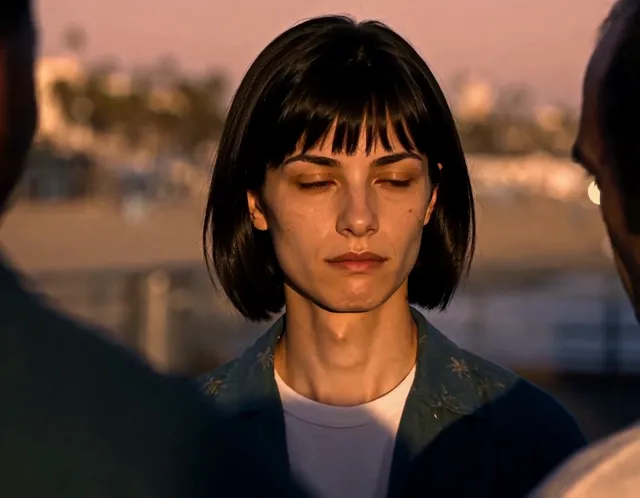
| Goodbye GTA | On the pier at sunset, Trevor holds your character by the shoulder beside Franklin and Michael; the tears in close-up, then the drive off. |
| One Last Ride | On a hill above Los Santos, your character says goodbye to the three of them, then gets into a taxi where the new pair is waiting. |
| Goodbye Vice City | On a bridge in Vice City at sunset, Tommy and the crew see your character off; the tears, a smile, then the drive away in the pink car. |
The templates swap the face and the hair and keep the clip's outfit, which is what lets you stand in the shot next to the GTA heroes. When a woman takes the young man's place, the template switches his lines to a woman's voice by itself.
Step 3: replace
- Open the template. In Video, Replace, click Use template under the trending templates, or open Goodbye GTA directly.
- Cast yourself. Pick your character in the "You" slot: the instruction writes itself.
- Press Replace. The price of the whole clip shows first. The edit takes a few minutes and lands in your Creations as one video, on the original music. A render that fails is refunded.
- Download and post. The MP4 is ready for TikTok, Reels and Shorts.
Your own GTA clip instead
- Another version of the trend. Paste its TikTok, Instagram Reel or YouTube Short link into Replace and @mention your character. A clip longer than ten seconds is recast shot by shot.
- A clip you made. Render a GTA-style scene first (our GTA 6 AI video guide shows how), then recast its people with you and your friends.
- Several people. @mention your characters in the order the people stand, left to right, and choose what each one wears.
Getting a clean swap
- Clear photos make a clear face. The close-up is where a weak identity sheet shows.
- Pick clips where your person is easy to see. A face turned away for the whole shot, or several people pressed together, gives the engine less to work with.
- Swap the music afterwards if you like: open the result in eroq's Editor.
Consent, plainly
Put in your own face, or a friend who agreed to it. Never an ex, a stranger, a streamer, an actor or a celebrity: eroq's policy bans real, identifiable people without their consent and enforces it on the account. Everyone shown is 18 or older, and nothing sexual ever goes near a real person's face. Our own galleries, like Bae-Luxe's and Roxy's, are drawn fan art of the game's characters, never real people.
What it costs
eroq is free to start: new accounts get free credits with no card, enough for your character's identity sheet, and picking a template and setting up the swap cost nothing. The render itself needs credits from a pack or a plan, and the price shows on the button before you click.
For the other launch formats, from the loading screen to "GTA 6 vs real life", see all the GTA 6 AI trends.
Sources
eroq's AI character swap page, GTA 6 AI page and Goodbye GTA walkthrough.
FAQ
How do I put myself in GTA 6 with AI?
Make a character from a few photos of yourself on eroq, open Video, Replace and pick a GTA template such as Goodbye GTA, cast your character and press Replace. The clip comes back with your face, the moves and the sound kept.
How do I do the Goodbye GTA trend with my face?
Open the Goodbye GTA template in eroq's Replace, cast a character made from your photos in the "You" slot, and press Replace. You stand on the pier next to Trevor, Franklin and Michael, with the original timing and music.
Can I put a friend in it?
Only if they agree. Real, identifiable people need their consent, and everyone shown must be 18 or older.
Is there a free AI character swap?
New eroq accounts get free credits with no card, which cover your first character's identity sheet. The swap render itself needs a pack or a plan.
Does a woman keep the man's voice in the goodbye clip?
No. When a female character takes his place, the template switches his lines to a woman's voice, with the same timing.


 eroq


