

The GTA 6 AI trends of launch week are the goodbye clips to GTA V's three heroes, the loading-screen filter that redraws your photo as GTA art, and "GTA 6 vs real life" clips that turn real streets into the game. Each can be made with your own face from one photo or one template on our sister site eroq.ai; here is what each looks like and how to make it.
eroq is made by the same team as GoonTheftAuto. Neither site is affiliated with Rockstar Games: these are fan formats, never footage from the game.
The trends at a glance
| Trend | What you see | When it peaked | Make it with |
|---|---|---|---|
| Goodbye GTA | Someone saying farewell to Michael, Franklin and Trevor at sunset, in tears | The week before release | A Replace template on eroq |
| GTA 6 loading screen | A real photo turning into GTA loading-screen art | Release week | The GTA filter, or Image, Edit |
| GTA 6 vs real life | A real street next to the same street in the game | Launch week | The GTA 6 vs real life effect |
| Your own GTA trailer | Fan-made trailers and fake "gameplay" | All year | eroq's video generator and Cinema |
1. Goodbye GTA: the farewells
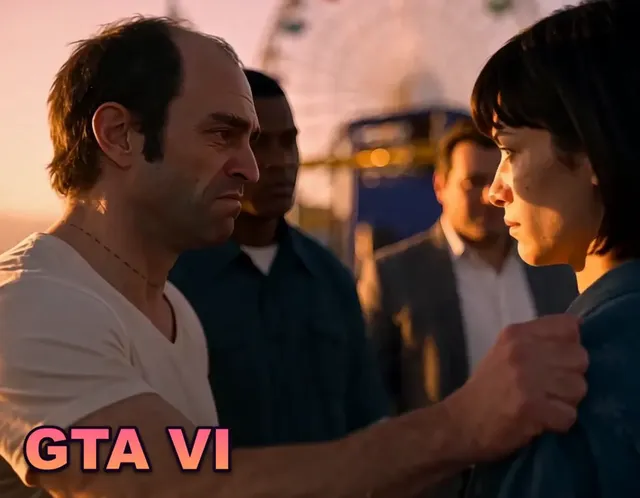
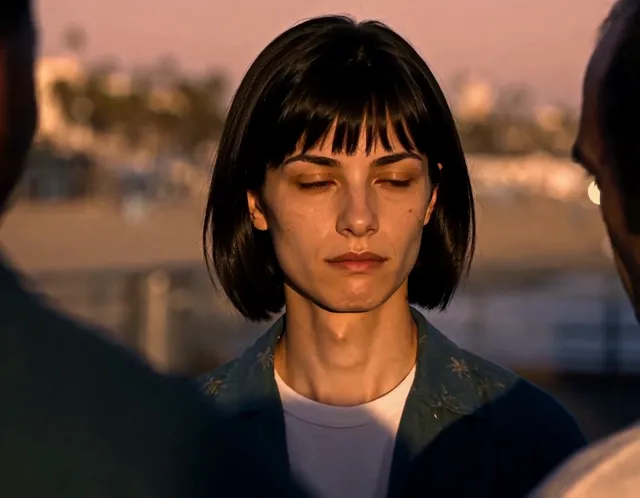
What it is. On the pier in Los Santos at sunset, a young man stands in front of Michael, Franklin and Trevor, shown as if they were real people, and holds back the tears while Trevor grips his shoulder, then drives off toward Vice City. A Japanese creator's AI clips started it on November 10; the sequel, "thank you for thirteen years", passed 110,000 likes in a day. Two more goodbyes followed: One Last Ride, on a hill above Los Santos, and Goodbye Vice City, on a bridge at sunset with Tommy and the crew.
Make it. All three are ready-made templates in eroq's Video, Replace: make a character from a few photos of yourself, pick the template, press Replace. eroq Replace Pro puts your face in the original clip, shot for shot, with its music; a woman in his place speaks with a woman's voice. Step by step: put yourself in GTA 6.
2. The GTA filter and the loading screen
What it is. Your photo redrawn as the illustrated art of a GTA loading screen: ink outlines, cel shading, palm trees, a pink and orange Vice City sunset. The TikTok version opens on the real photo captioned "Your GTA 6 loading screen", then the art slides in. It began as a CapCut template that had 151,781 uses by November 15, and on release day papers as far away as Brazil printed how-tos.
Make it. On eroq, the GTA filter in Video, Effects turns one photo into the art as a five-second clip on eroq Motion One. For a still poster, Image, Edit does it with your face kept. Our GTA 6 loading screen guide has the prompt and the variations (couple, crew, night), and eroq's GTA AI filter guide covers the effect.
3. GTA 6 vs real life
What it is. Real streets, mostly in Miami, side by side with the game, and game shots so realistic that people take them for phone videos. Our Vice City guide and the Leonida map show the in-game side.
Make it. Take a photo of your street and pick GTA 6 vs real life in eroq's Video, Effects. The clip starts on your photo, then turns it into a shot of a next-generation open-world game while the camera glides on. Post it next to your photo.
4. Your own GTA trailer
What it is. Long before launch, AI-made GTA 6 clips were pulling millions of views on TikTok and Instagram, often with a giveaway like a car changing model mid-shot. Rockstar had some that closely copied its official promotional material taken down on X.
Make it, honestly. Write a Vice City scene or a whole trailer, cast yourself, and label it as a fan-made AI video. Our GTA 6 AI video guide covers single clips and eroq's Cinema, where a director chat writes the shots of a trailer for you.
Beside the AI trends
- "Is playing GTA 6 cheating?" Viral TikToks argue that nurturing Jason and Lucia's romance (answering texts, spending time together) counts as cheating on your real partner. Mostly engagement bait, and very shareable.
- Mandy. One Chapter 1 tenant with a broken sink became a launch-week trend of her own within hours (our Mandy guide).
- The Real Dimez. Roxy and Bae-Luxe, the game's rap duo, were the other pair of the pre-launch fan art, right behind Lucia and Jason (our fan art guide).
Rules for every trend
- Your face or your characters. Real, identifiable people need their consent, and everyone shown is 18 or older.
- The look, not the logos. GTA, Vice City, Los Santos and the game's characters belong to Rockstar Games and Take-Two Interactive. Post your version as a fan tribute.
- Free to start. New eroq accounts get free credits with no card, enough for a few GTA-style stills. Clips and templates need a pack or a plan; every price shows before you click, and a render that fails is refunded.
Sources
eroq's GTA 6 AI trends, Goodbye GTA and GTA AI filter articles; ViralRemix on the loading screen trend; O Liberal; SVG on the cheating debate; OtakuKart on AI GTA 6 clips.
FAQ
What are the GTA 6 AI trends?
The formats filling TikTok and Reels around the November 19, 2026 launch: the goodbye clips to Michael, Franklin and Trevor, the GTA filter that turns a photo into loading-screen art, and "GTA 6 vs real life" clips of real streets turned into the game.
What is the Goodbye GTA trend?
An AI clip where someone says a tearful farewell to GTA V's three heroes on the pier in Los Santos at sunset, then drives off toward Vice City. On eroq it is a Replace template: cast a character made from your photos and your face takes the young man's place.
How do I do the GTA 6 loading screen trend?
Drop a photo of yourself into the GTA filter on eroq for a five-second clip, or into Image, Edit for a still poster, then add the "Loading…" caption in TikTok's editor.
Can I make the GTA 6 AI trends for free?
New eroq accounts get free credits with no card, enough for a few loading-screen stills. Clips and the goodbye templates need a pack or a plan.


 eroq


